3️⃣ TMVGate Settings
The key settings that determine the operating characteristics of TMVGate are defined in the TMVGate.json file in the application folder.
Below is a list of configurable key settings in the TMVGate.json file:
TMVGate Settings
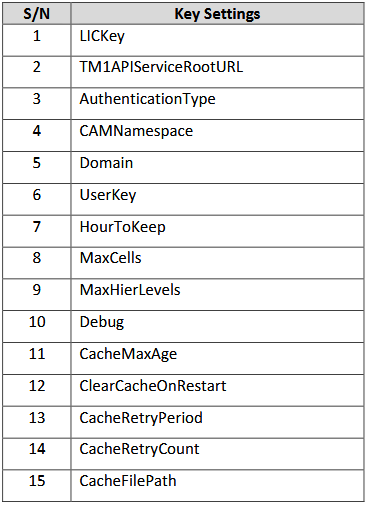
LICKey

The LICKey can be a trial or subscription license key. TMVGate works only during the trial period for a trial license key. After buying a subscription license, update the LICKey with the purchased key.
TM1APIServiceRootURL

The TM1APIServiceRootURL key specifies the TM1 REST API Service Root URL address of the PA/TM1 Server
AuthenticationType

The AuthenticationType key specifies the TM1 authentication mode. TMVGate supports Basic, IBM Cognos BI (also known as Cognos Authentication Manager or CAM), and Windows Integrated authentication modes. To use Cognos Authentication Manager (CAM) mode, set the value to “CAMNamespace”. To use Windows Integrated authentication, set the value to “Domain”.
CAMNamespace

The CAMNamespace key specifies the CAM Namespace ID for Cognos Authentication Manager (CAM) mode of authentication. Please note that the value of the CAM Namespace ID is case sensitive.
Domain

The Domain key specifies the Domain Name for authentication using Windows Integrated mode.
UserKey

The UserKey key determines if the UserKey Security feature is enabled. When set to True, the TM1 user security context after “&pUserKey” can be adjusted for different contexts. This allows applications like Power BI to dynamically set user security when making URL data requests.
HourToKeep

The HourToKeep key specifies the duration for which cache files created during TMVGate processing are retained in the cache folder before being deleted. The default value is 72 hours.
MaxCells

The MaxCells key specifies the maximum number of data cells that can be processed per request. If the number of cells for the request exceeds this value, the request will be rejected.
MaxHierLevels

The MaxHierLevels key specifies the maximum number of levels that can be returned for the dimension hierarchy extract. If the number of levels for the dimension subset exceeds this value, the request will be denied.
Debug

The Debug key specifies the debug level of logging for TMVGate processes. When set to "False", it logs basic information about the progress of requests processed by TMVGate. Setting it to "True" results in more detailed logging of request progress, which generates larger log files.
CacheMaxAge

The CacheMaxAge key sets the maximum time, in minutes, that a cached response remains reusable after it is completed.
ClearCacheOnRestart

The ClearCacheOnRestart key specifies whether all cache records will be cleared every time TMVGate is restarted.
CacheRetryPeriod

The CacheRetryPeriod key specifies the number of seconds a request will wait for the completion of caching result in the Cache for each retry.
The default value for CacheRetryPeriod is 10 seconds.
CacheRetryCount

The CacheRetryCount key specifies the number of retries a request will make to verify the completion of caching results before bypassing the cache.
The default value for CacheRetryCount is 720.
CacheFilePath

The CacheFilePath key is optional and specifies the cache folder location, which defaults to the application folder.