2️⃣ Using the URL Generator
Copy the ‘TMVGateURLGenerator.exe’ in the TMVGate distribution package into a folder in a local drive.
Double click on the ‘TMVGateURLGenerator.exe’ to start up the URL Generator.
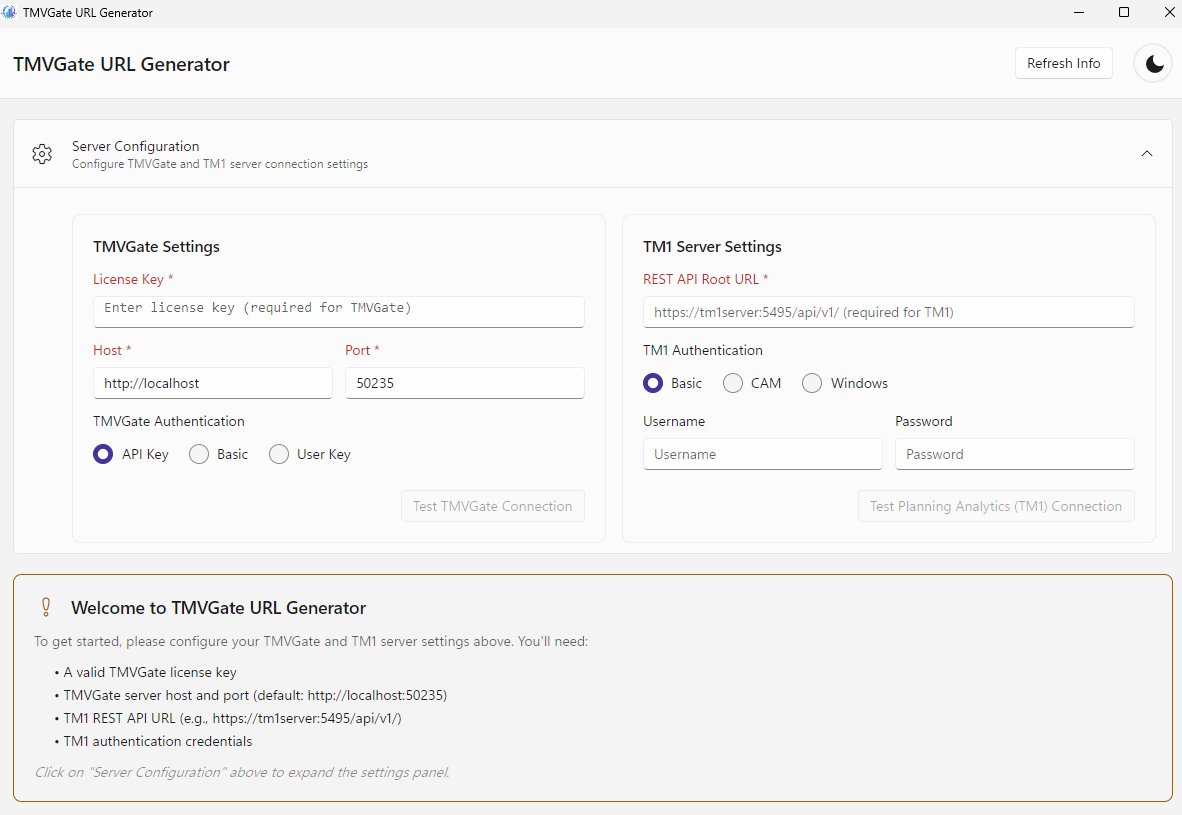
Update the TMVGate Server information:
- License Key – the TMVGate URL Generator License key.
- TMVGate Authentication – APIKey, Basic or User Key Authentication. For Basic and User Key Authentication, the generated URLs are further secured by requiring requests to provide TM1 user ID and password or the User Secret Key.
- Host – IP address of the TMVGate server in http://w.x.y.z .
- Port – the Port number that was specified during installation or configured in TMVGate Server.
Update the TM1 Server information:
-
REST API Root URL
a. Replace “http://” with “https://” if UseSSL is defined as T (true) in TM1s.cfg.
b. Update the IP address and Port address with that of the designated TM1 Server. -
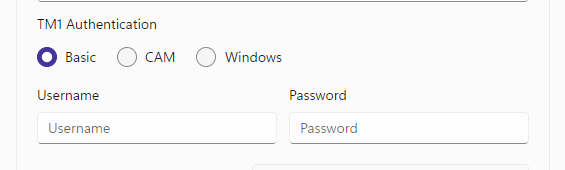
Select TM1 Authentication type and provide:
a. Username and Password for Basic Authentication:
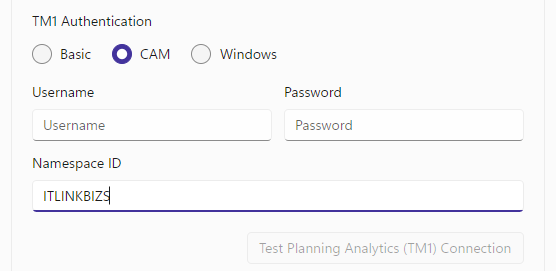
b. CAM Namespace ID, Username and Password for CAM Authentication
(CAM Namespace ID is case sensitive):
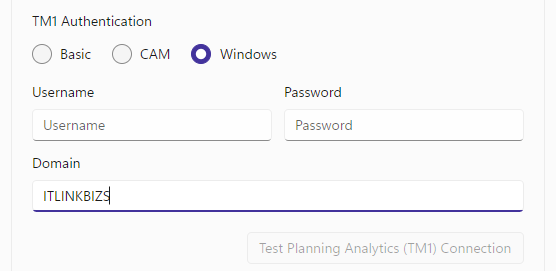
c. Windows Domain Name, Username and Password for Windows Authentication:
Select the Display Control Objects if control objects are included in the Cube or Dimension listing for “Create Get View URL” or “Create Get Hierarchy URL”.
Upon clicking on the “Retrieve Cube Data”, “MDX Query”, “Retrieve Dimension Hierarchy” or “POST MDX” button, the information of the TMVGate and PA TM1 Servers will be saved to the “TMVGateURLGenerator.Config” file in the “TMVGateURLGenerator.exe" folder.
Create Get View URL
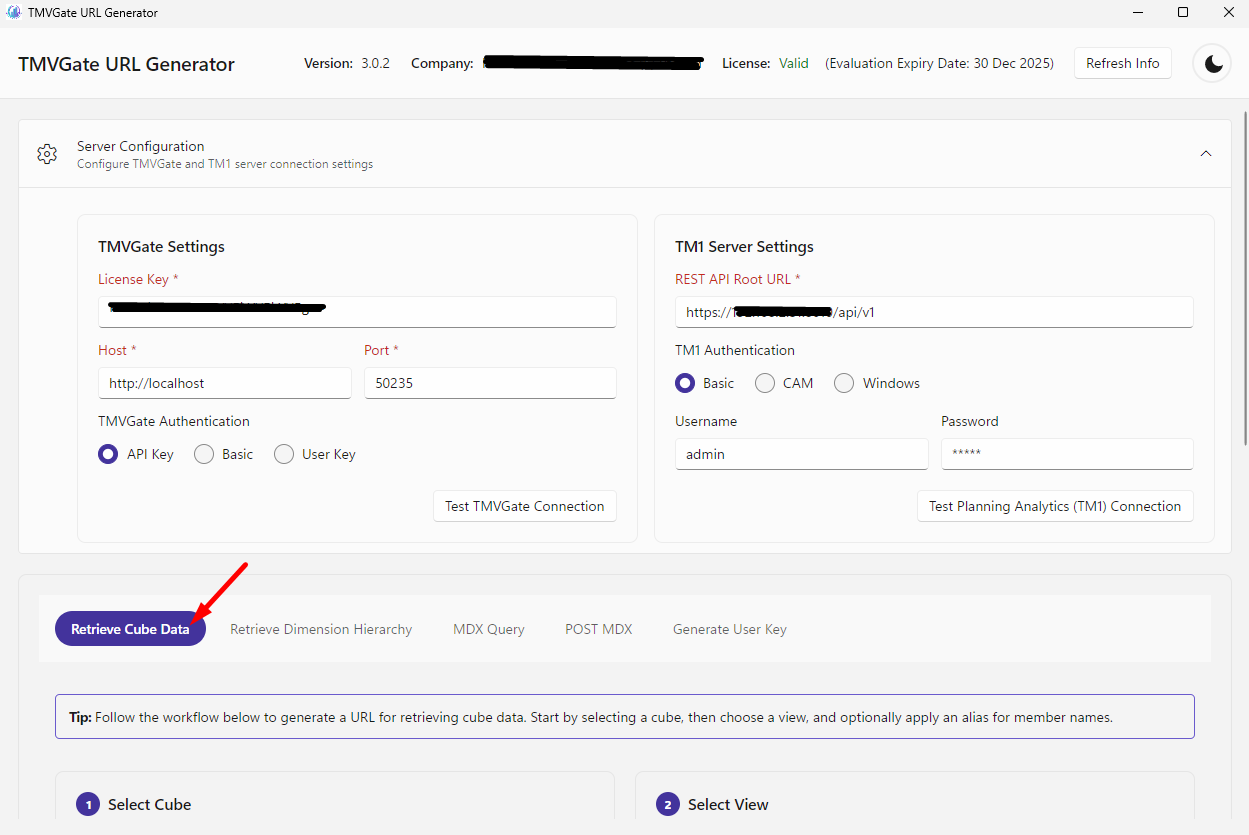
The “Retrieve Cube Data” is used to generate a URL for retrieving cells from a Cube View. When the “Retrieve Cube Data” is clicked, the cubes and cube’s views names will be retrieved from the TM1 Server and will be populated to the corresponding dropdown boxes. The captions in the text box below the “Retrieve Cube Data” button provides a step-by-step instruction on the required parameters:
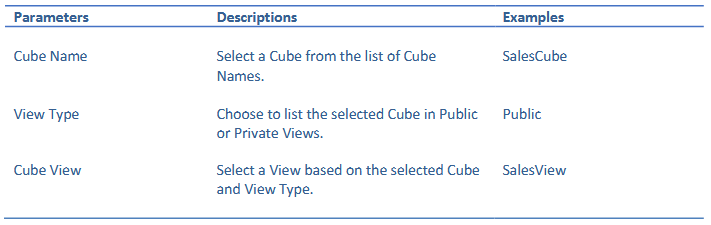
Dimension and Alias Options
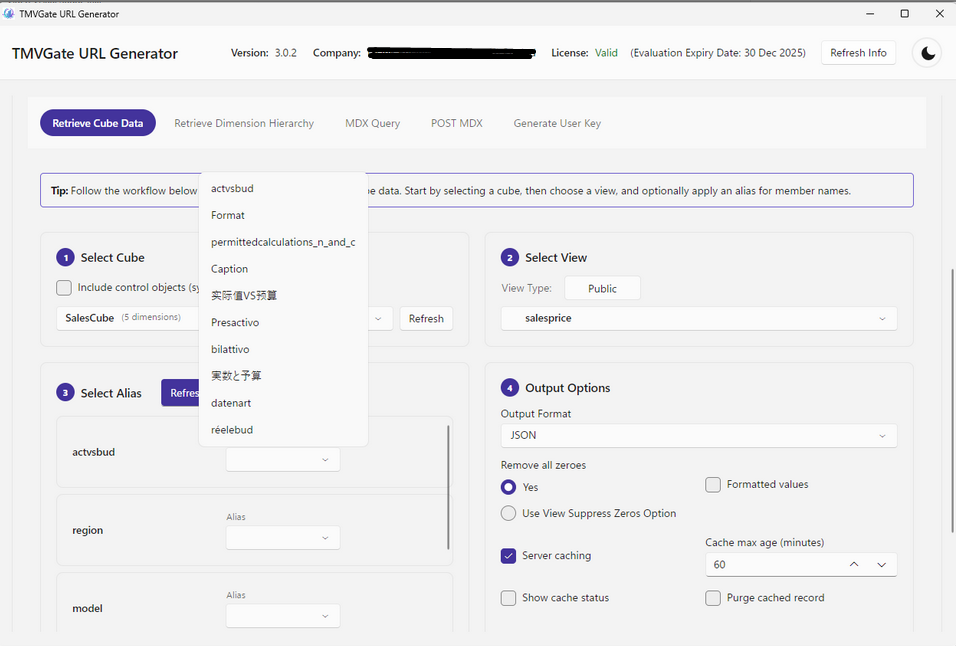
Once a Cube View is selected, the “Refresh Dimension & Alias” button will be enabled.
Upon clicking on the “Refresh Dimension & Alias” button, the Alias dropdown boxes for each corresponding Dimension of the Cube View will be updated.
You may choose to select the Alias of any of the Dimensions of the Cube View as the output by selecting the Alias in the Dimension Alias dropdown boxes.
Get View Output Options
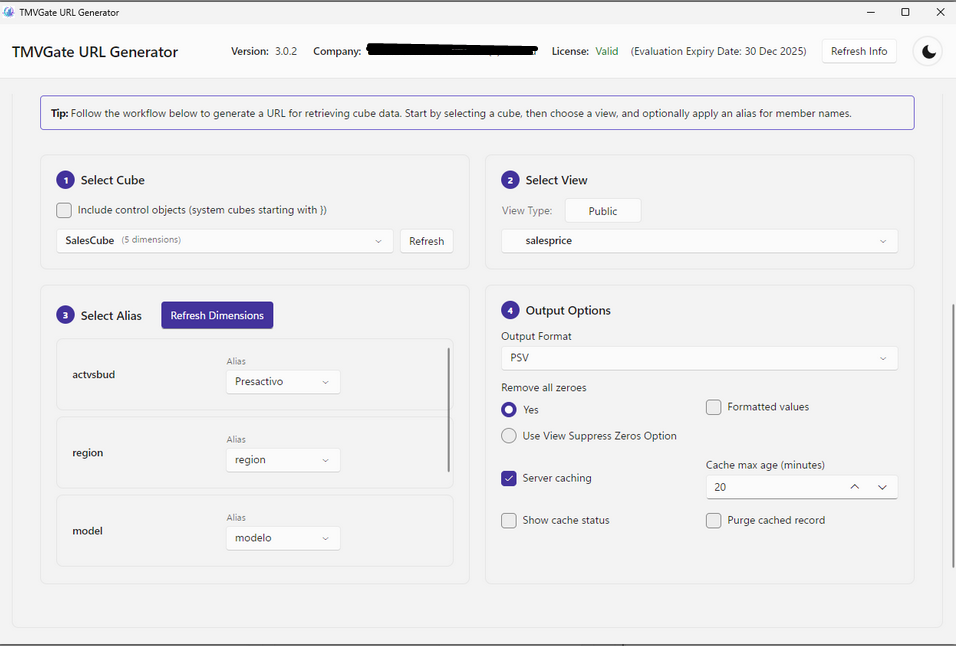
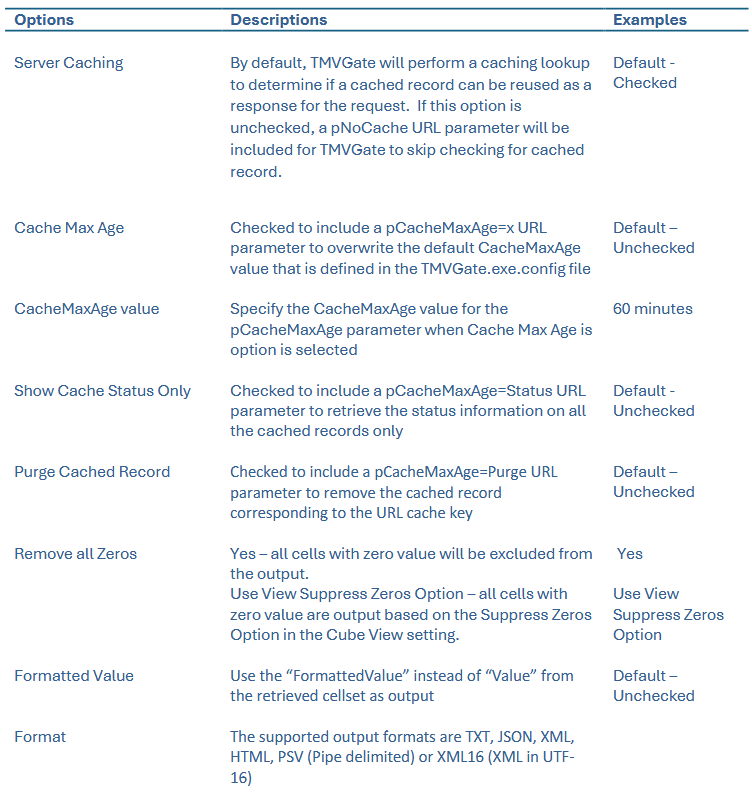
The following Output Options can be specified for the Get View URL:
Note
Server Caching
The processed outputs of Get View requests are cached by TMVGate. The validity of cache records depends on the matching of the cache key and CacheMaxAge. The Cache Key for a Get View request comprises of “Cube Name”, “View Name”, “Format”, “View Type, “Alias”, “View Suppression Option” and “Username”.
CacheMaxAge
For a cached record to be valid and reusable as a response to a request, the request cache key must match with the cached record and the period in minutes between the completion time of the cached record and the time of the request must be within or equal the CacheMaxAge value. The default value for CacheMaxAge is defined in TMVGate.json file and can be superseded by selecting the Cache Max Age option and providing an overwriting value in the textbox.
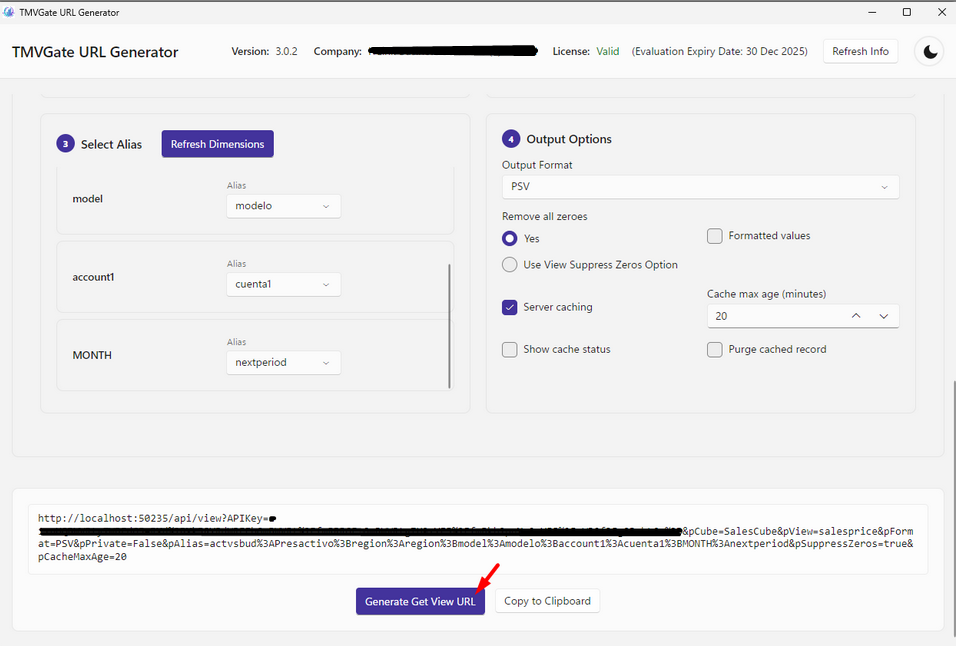
Clicking on the “Generate Get View URL” button will create the Get View URL in the output text box. The Get View URL can be copied to the clip board via the Copy button.
MDX Query
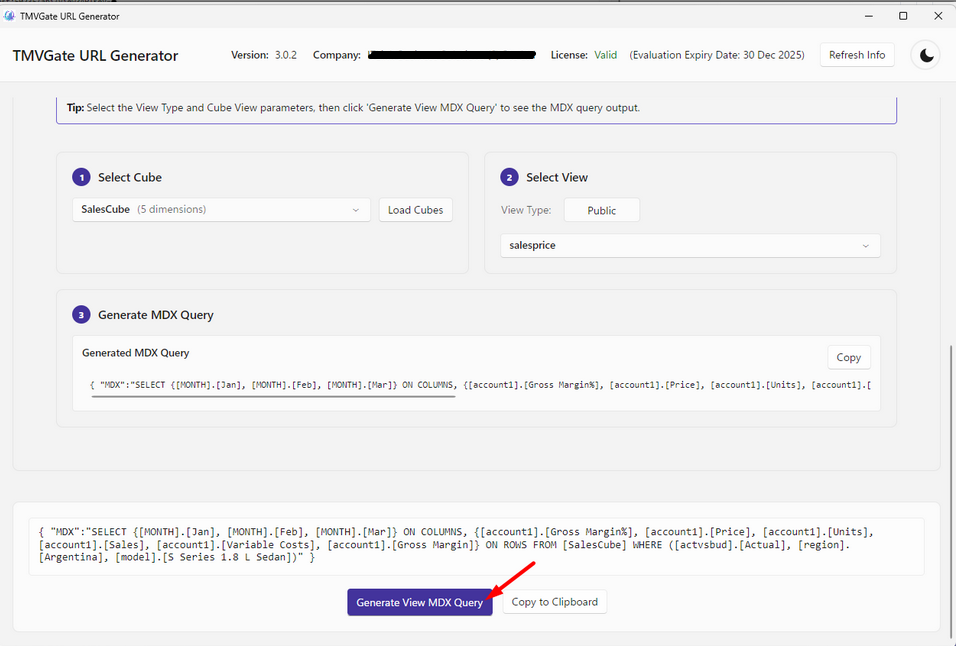
The “MDX Query” is used to generate the MDX Query Statement for a selected View of a Cube. When the “MDX Query” is clicked, the cubes and cube’s views names will be retrieved from the TM1 Server and be populated in the corresponding dropdown boxes. The captions in the text box below the “MDX Query” button provides step-by-step instruction on the required parameters:
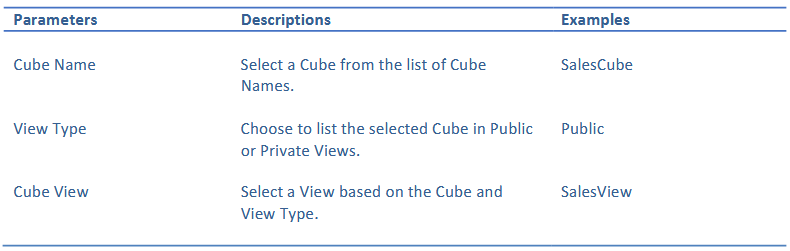
Clicking on the “Generate View MDX Query” button will create the MDX Query statement for the selected View in the output text box. The MDX Query statement can be copied to the clip board via the Copy button.
Retrieve Dimension Hierarchy
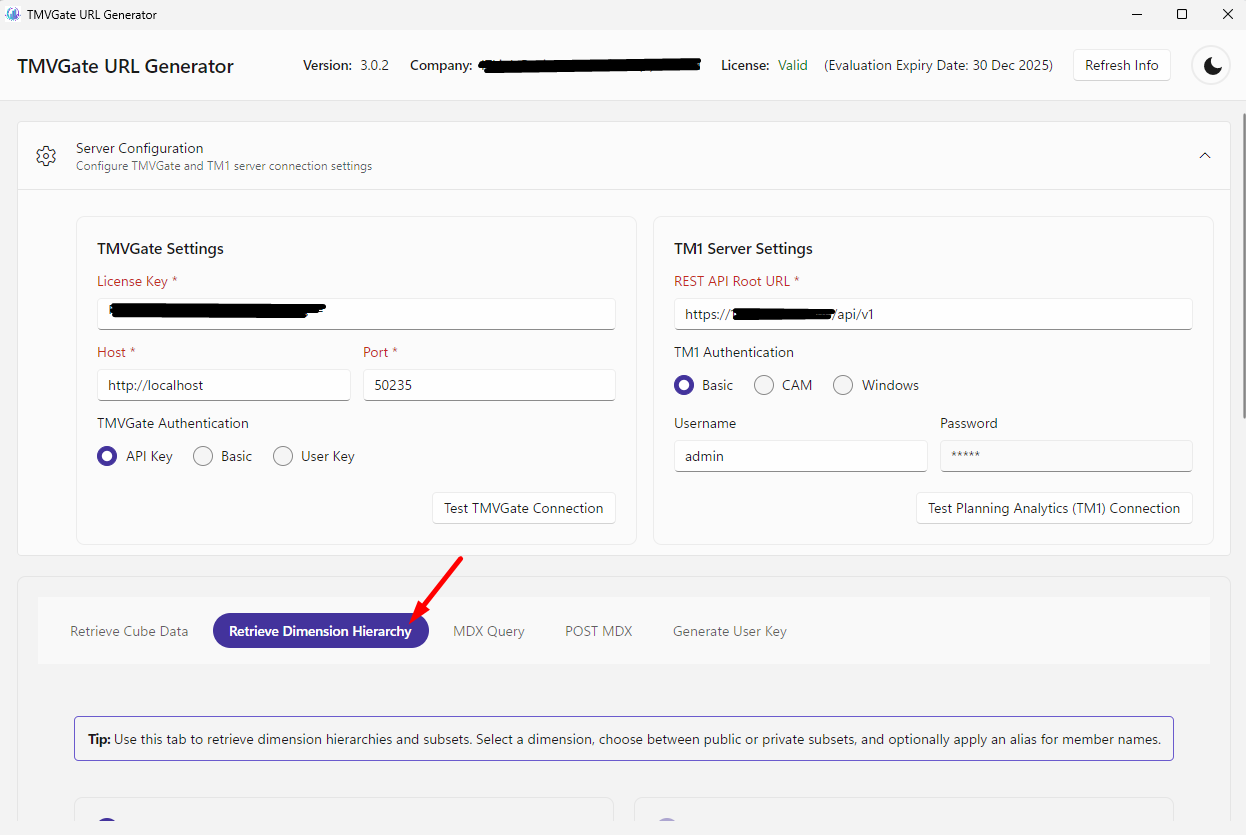
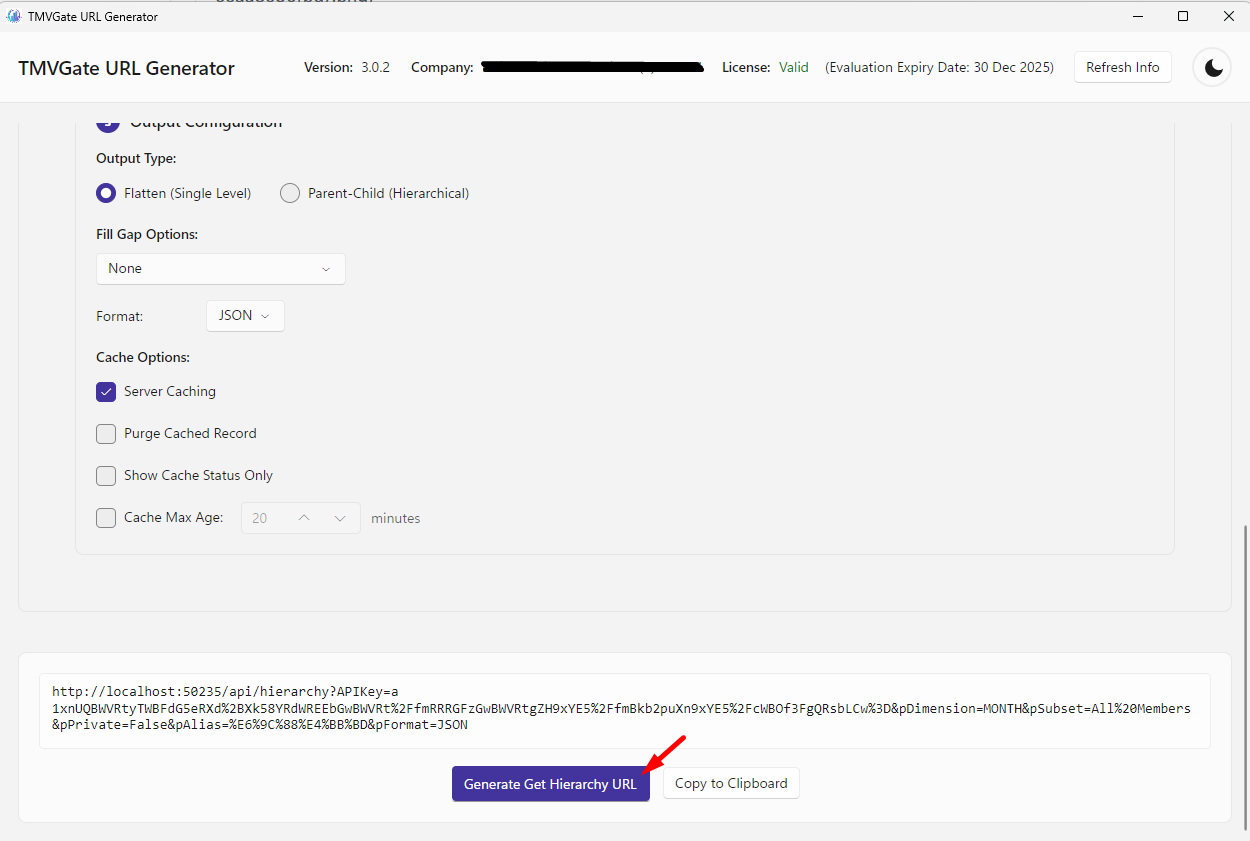
The "Retrieve Dimension Hierarchy" is used to generate URL for retrieving a flattened structure of a Dimension Subset. The caption in the text box below the "Retrieve Dimension Hierarchy" button provides step-by-step instruction on the required parameters:
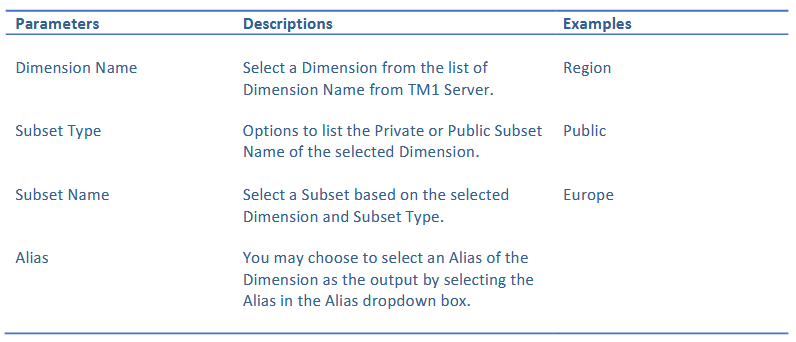
Retrieve Dimension Hierarchy Output Options
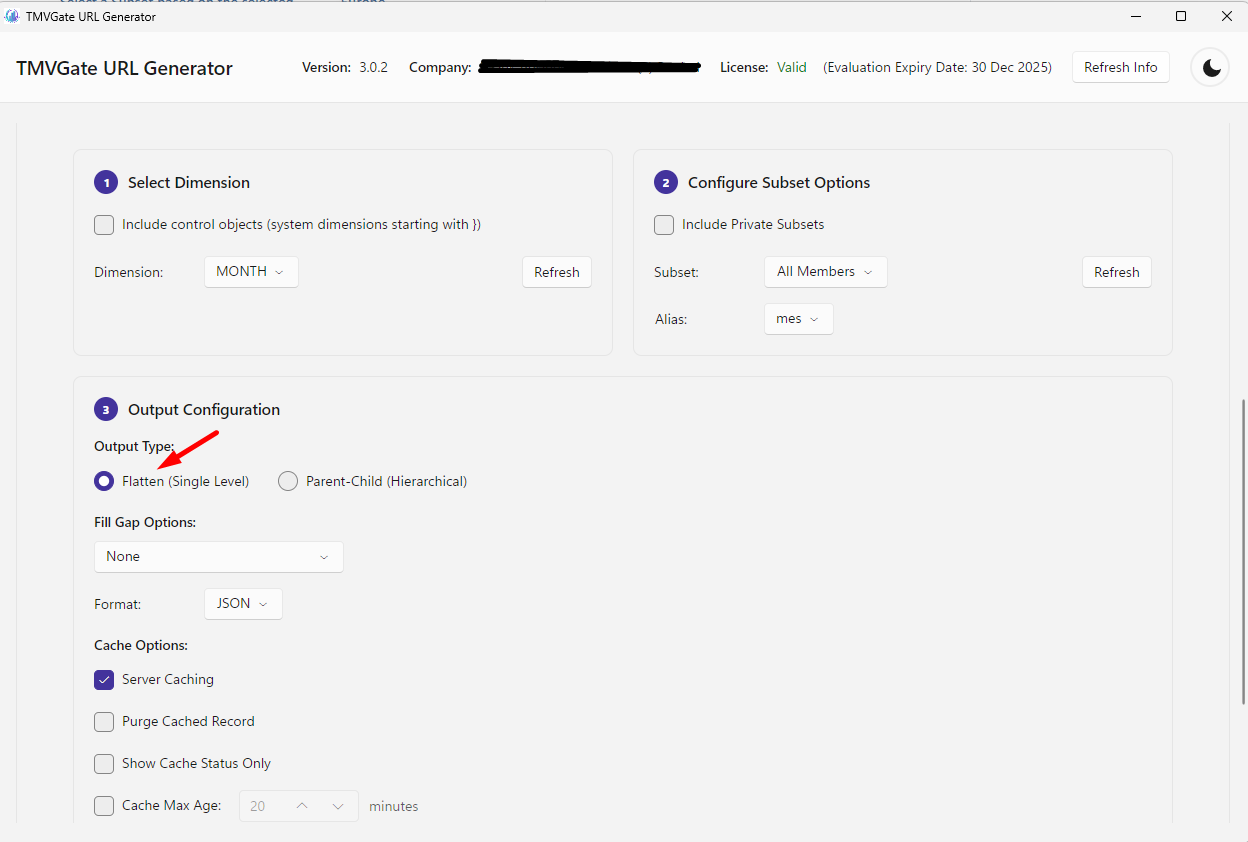
The following Output Options can be defined for Get Hierarchy URL:
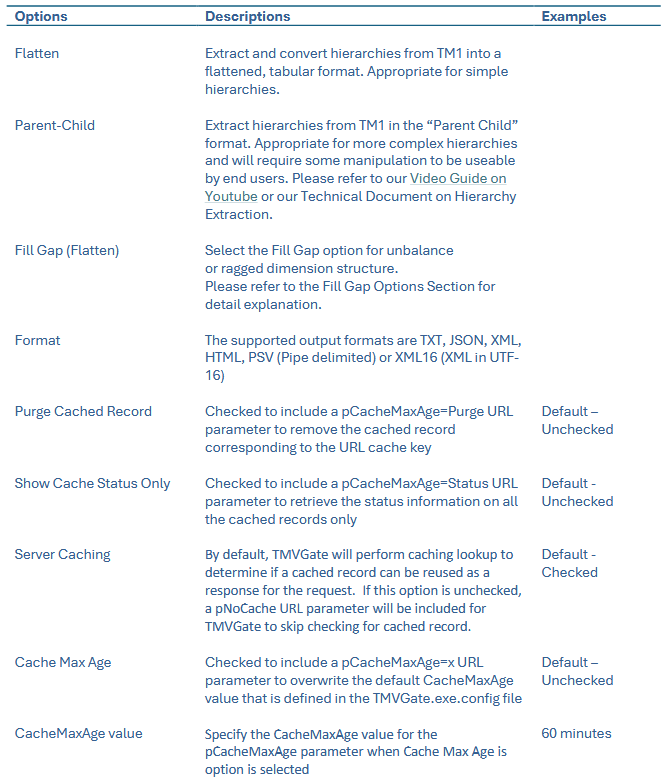
Note
Server Caching
The processed outputs of Get Hierarchy requests are cached by TMVGate. The validity of cache records depends on the matching of the cache key and CacheMaxAge. The Cache Key for a Get Hierachy request comprises of “Dimension Name”, “Subset Name”, “Format”, “Subset Type”, “Alias”, “FillGap Option” and “Username”.
CacheMaxAge
For a cached record to be valid and reusable as a response to a request, the request cache key must match with the cached record and the period in minutes between the completion time of the cached record and the time of the request must be within or equal the
CacheMaxAge value. The default value for CacheMaxAge is defined in TMVGate.json file and can be superseded by selecting the Cache Max Age option and providing an overwriting value in the textbox.
Clicking on the 'Generate Get Hierarchy URL' button will create the Get Hierarchy URL in the output text box. The Get Hierarchy URL can be copied to the clip board via the Copy button.
Fill Gap Options
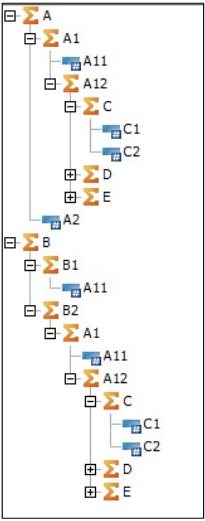
TM1/PA dimensions can be defined with an imbalanced and ragged tree structure. This structure would be a problem with most Analytics and Visualization tools that typically require a balanced tree structure. To address this, TMVGate provides a Fill Gap Option that determines how the gaps are filled in for imbalanced or ragged tree structure.
The following is a sample dimension to illustrate the Fill Gap Option:
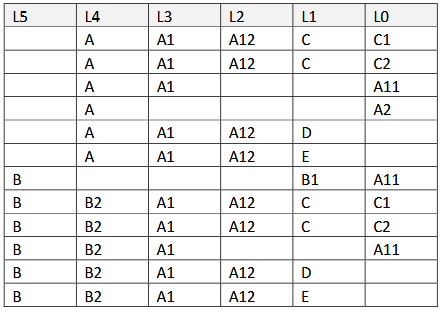
Fill Gap Option: N
Do not fill gaps; the generated output in a table as follows:
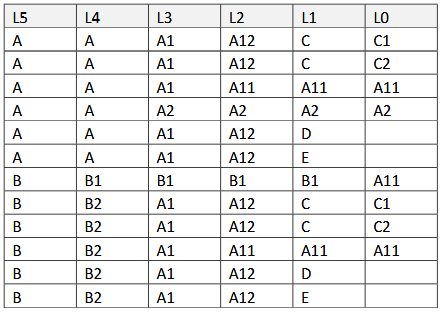
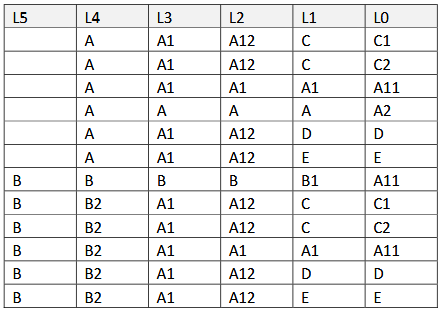
Fill Gap Option: L
Filling gaps from right to left; the generated output in a table as follows:
Fill Gap Option: R
Filling gaps from left to right; the generated output in a table as follows:
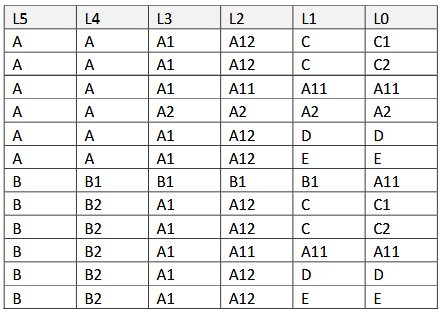
Fill Gap Option: LR
Filling gaps from right to left and then left to right; the generated output in a table as follows:
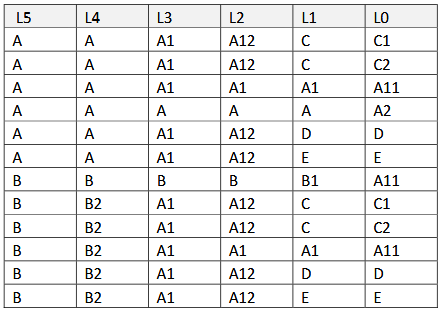
Fill Gap Option: RL
Filling gaps from left to right and then right to left; the generated output in a table as follows:
POST MDX
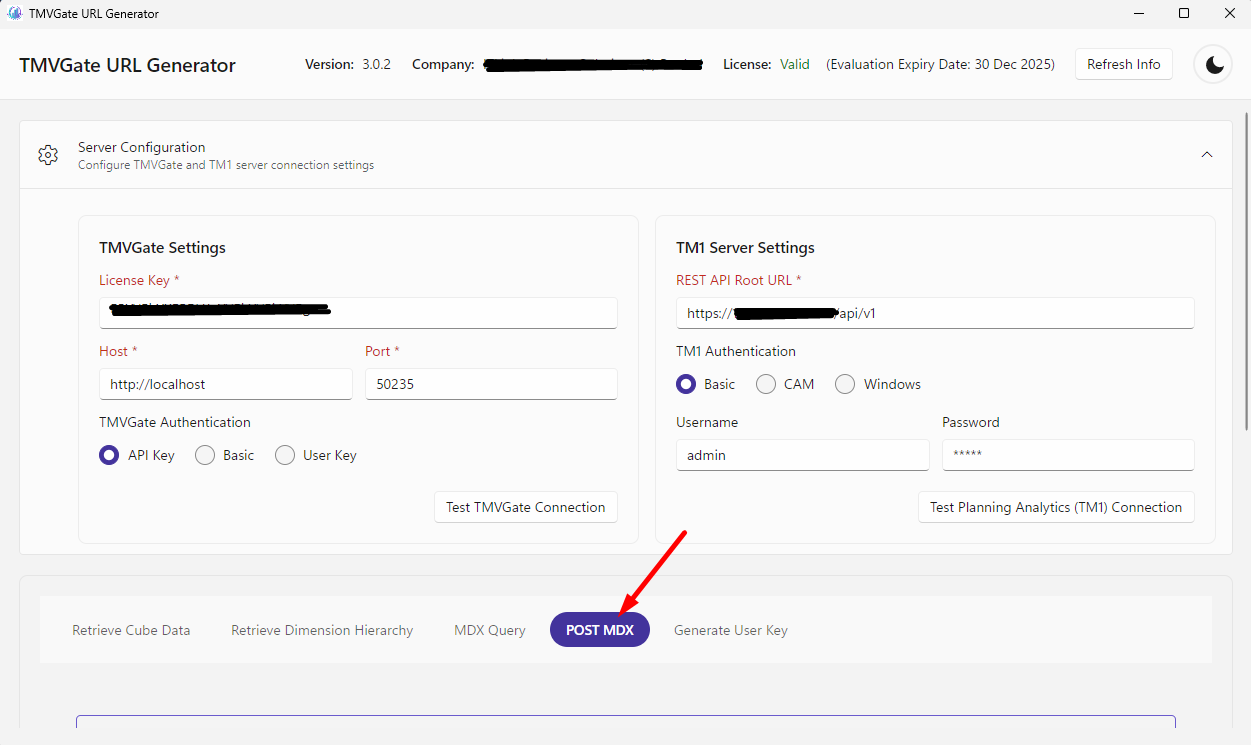
The “POST MDX” function is used to generate a URL for posting an MDX request to the TM1 Server via TMVGate. TMVGate, upon receiving a POST MDX request from an application, will
retrieve the cells based on the MDX query request to TM1 and return it to the calling application. The caption in the text box below the “POST MDX” button provides instructions on the required parameters and options:
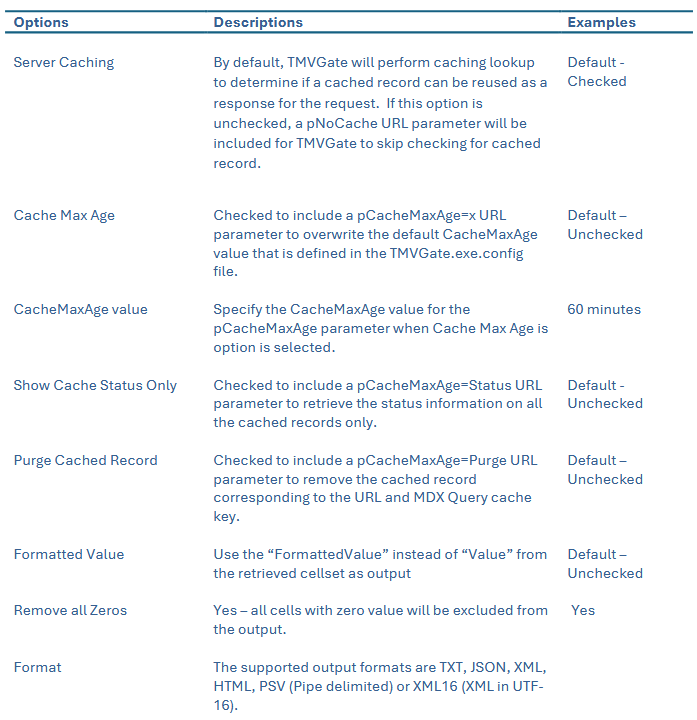
The following Output Options can be defined for the POST MDX:
Note
Server Caching
The processed outputs of POST MDX requests are cached by TMVGate. The validity of cache records depends on the matching of the cache key and CacheMaxAge. The Cache Key for a POST MDX request comprises of “Request Body”, “Format”, “Alias”, “FillGap Option”, “Remove all Zeros Option” and “Username”.
CacheMaxAge
For a cached record to be valid and reusable as a response to a request, the request cache
key must match with the cached record and the period in minutes between the completion
time of the cached record and the time of the request must be within or equal the
CacheMaxAge value. The default value for CacheMaxAge is defined in TMVGate.json file
and can be superseded by selecting the Cache Max Age option and providing an overwriting
value in the textbox.
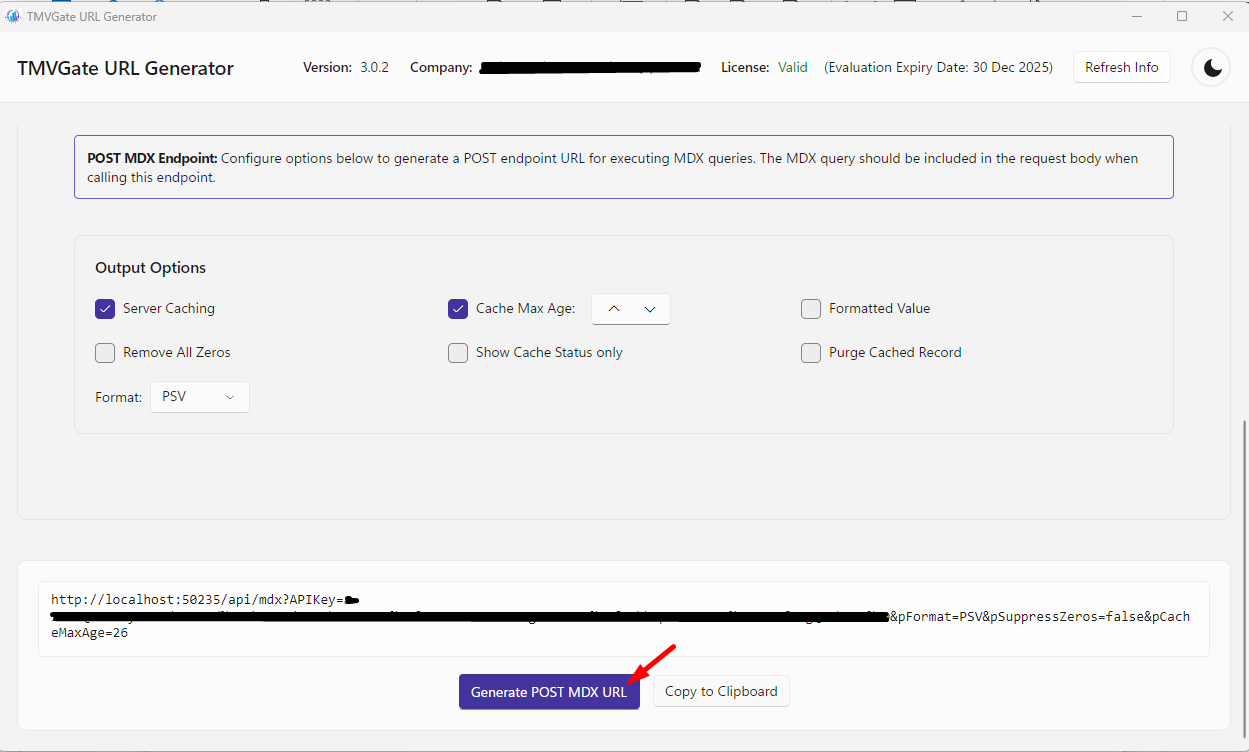
Clicking on the “Generate POST MDX URL” button will create the POST MDX URL in the output text box. The POST MDX URL can be copied to the clipboard via the Copy button.
Testing the Get View / Get Hierarchy URL
The generated URLs are based on the selected parameters and output options when the Generate Get View URL or Generate Get Hierarchy URL or Generate POST MDX URL are initiated.
The following is an example of a Generated URL:

To test the URL, simply copy the Generated URL and paste it onto a Web Browser. Depending on the Web Browser setup, the TMVGate output may be presented on the browser page, or the browser will prompt to save the TMVGate output to a file. For the initial testing, we suggest selecting Cube View with a small cell set or record count for validation.